A digital image may look smooth on your screen, but behind every shade of gray or color is a stack of tiny binary values. Each pixel is stored as a number. That number is written in bits. When you separate those bits by position, you can see how much each binary layer contributes to the final image.
That is where bit planes become useful.
They help students understand image processing, help engineers study visual information, and help compression systems decide which data matters most. The idea sounds technical at first, but the logic is simple: break a pixel value into binary layers, then study one layer at a time.
What Are Bit Planes?
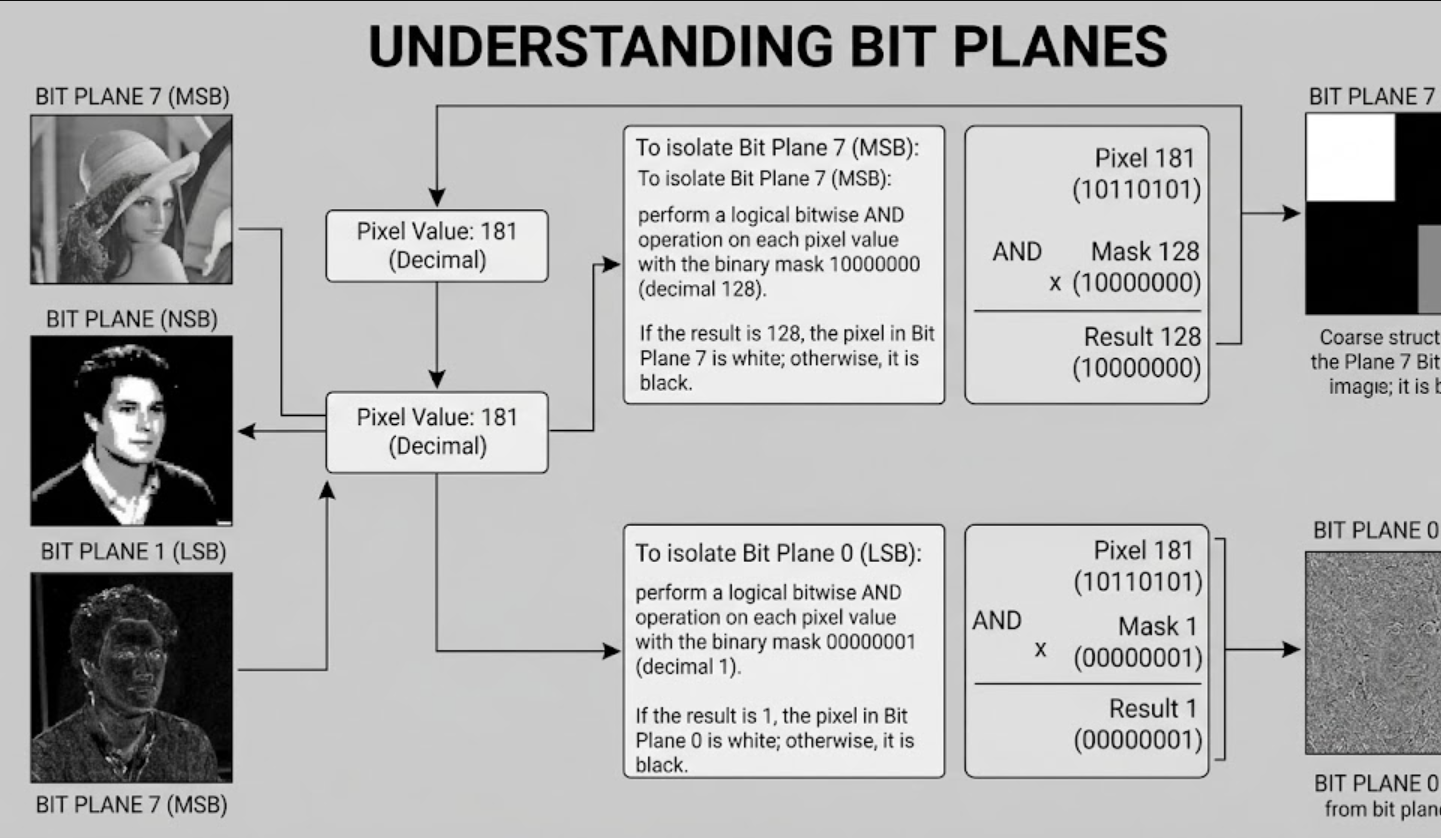
Bit planes are binary layers created from the same bit position across all pixels in an image or digital signal. In an 8-bit grayscale image, each pixel has a value from 0 to 255. That value can be written as an 8-digit binary number.
For example, the decimal value 181 is written as:
10110101
Each digit belongs to a different layer. The leftmost digit is the most significant bit, and the rightmost digit is the least significant bit.
The most significant bit affects the visible structure more strongly. The least significant bit often adds fine detail, texture, or noise.
Why This Concept Matters
Image processing is not only about making pictures look better. It is also about understanding how visual data is stored, simplified, compressed, secured, or analyzed.
Bit-plane slicing helps because it lets you study one binary layer at a time. Instead of looking at the full image, you can ask:
- Which layer shows the main shape?
- Which layer carries small details?
- Which layer mostly contains noise?
- Can the image still work if lower layers are removed?
- Which layers should be protected during compression?
This makes the concept useful in education, image compression, digital forensics, computer vision, and image enhancement.
How Bit-Plane Slicing Works
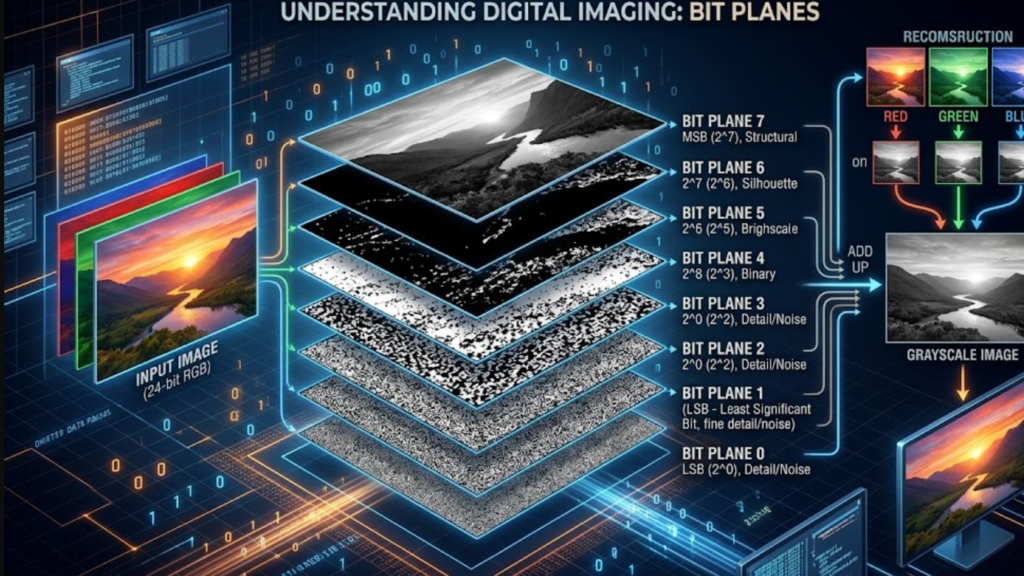
Bit-plane slicing separates an image into binary images based on bit positions. In an 8-bit grayscale image, there are 8 slices. Each slice contains only 0s and 1s.
The basic process is simple:
- Take the pixel value.
- Convert it into binary.
- Extract each bit position.
- Create a binary image for each position.
- Compare the visual importance of each layer.
Here is how the value 181 works:
| Bit Position | Binary Digit | Value Contribution |
|---|---|---|
| 7 | 1 | 128 |
| 6 | 0 | 0 |
| 5 | 1 | 32 |
| 4 | 1 | 16 |
| 3 | 0 | 0 |
| 2 | 1 | 4 |
| 1 | 0 | 0 |
| 0 | 1 | 1 |
When you add the active values, you get:
128 + 32 + 16 + 4 + 1 = 181
This is why higher-order bits matter more. Changing the highest bit can change a pixel dramatically. Changing the lowest bit may barely affect what the human eye sees.
MSB vs LSB
Two important terms appear often in this topic: MSB and LSB.
Most Significant Bit
The most significant bit, or MSB, is the highest-value bit in a binary number. In an 8-bit image, it is usually bit position 7.
This layer often shows the rough structure of the image, including major shapes, borders, shadows, and bright-versus-dark areas. If this layer is damaged or removed, the image may lose its main visual meaning.
Least Significant Bit
The least significant bit, or LSB, is the lowest-value bit. In an 8-bit image, it is usually bit position 0.
This layer usually contributes tiny brightness changes. It may contain fine texture, random-looking patterns, or sensor noise. Because it has a small visual effect, it is often discussed in watermarking, steganography, and low-impact data hiding.
A Simple Real-World Example
Imagine a grayscale photo of a face.
The high-order layers show the broad shape: hair, eyes, nose, face outline, shadows, and background. Middle layers add smoother tones and texture. Low-order layers may show tiny variations that are hard to notice in the full image.
Also Read: Fielder Jewett Age How Old Is He and What You Should Know
If you keep only the top four layers, the face may still be recognizable. It may look less smooth, but the subject remains clear. If you keep only the bottom layers, the result may look like scattered noise.
This is the practical value of the method. It helps you understand how much information is needed for a useful image.
Common Uses of Bit-Plane Analysis
1. Image Compression
Compression reduces file size while trying to keep useful visual quality. Since higher-order layers often carry more visible information, compression methods may preserve them more carefully.
This does not mean lower layers are always useless. In medical imaging, scientific imaging, or professional editing, small tonal differences can matter. But in many everyday images, the human eye is less sensitive to tiny changes in low-value data.
2. Image Enhancement
Bit-plane slicing can help identify which layers contribute to contrast and structure. In some cases, selected layers can be emphasized or combined to improve visibility.
This can help with scanned documents, object detection, old photos, and quality inspection.
3. Digital Watermarking and Steganography
The lowest layers can sometimes be changed without creating a visible difference. That makes them a common topic in watermarking and steganography.
A watermark may help prove ownership. Steganography may hide information inside an image. Both uses require ethical and legal handling.
4. Computer Vision and AI
Modern computer vision systems sometimes use bit-level representations to reduce computation, improve privacy, or study image features more efficiently.
Recent research has also explored bit-plane slicing for privacy-preserving machine learning, where pixel values are decomposed into binary layers before privacy methods are applied. This is still an active research area, so results depend on the dataset, model, and use case.
5. Image Forensics
Forensic analysts may inspect low-level patterns to detect manipulation, hidden data, or unusual noise. If the lowest layers look inconsistent with the rest of the image, it may suggest editing or embedded information.
This is not proof by itself. It is one clue that should be checked with other forensic methods.
Bit-Plane Slicing in Color Images
Grayscale images are easier to understand because they usually have one channel. Color images add more detail because they often use red, green, and blue channels.
A standard 24-bit RGB image usually contains:
- 8 bits for red
- 8 bits for green
- 8 bits for blue
Each channel can be sliced separately. You can study the red channel’s binary layers, the green channel’s binary layers, and the blue channel’s binary layers.
This helps when one color channel carries more useful information than another.
Advantages and Limitations
| Area | Benefit | Limitation |
| Learning | Makes binary image data easier to understand | Can feel abstract without examples |
| Compression | Helps identify important visual layers | Not a complete compression method alone |
| Forensics | Reveals unusual low-level patterns | Needs expert interpretation |
| Enhancement | Can isolate useful image information | May increase noise if used poorly |
| AI research | Supports low-level image representation | Results depend on the task and dataset |
Practical Tips for Beginners
If you are learning this concept for the first time, start with a grayscale image. Color images are useful later, but they can make the topic confusing at the beginning.
Try this simple path:
- Use a small 8-bit grayscale image.
- Convert a few pixel values into binary by hand.
- Separate the image into 8 binary layers.
- Display each layer as black and white.
- Compare the top layers with the bottom layers.
- Rebuild the image using only selected layers.
This exercise quickly shows why some layers are visually powerful and others are subtle.
Common Mistakes to Avoid
Beginners often think all layers have equal importance because each one has the same number of pixels. That is not true. The position of the bit determines its value.
Another mistake is assuming the lowest layer always contains meaningless noise. It often looks noisy, but in high-precision images, even small values may carry important information.
A third mistake is treating bit-plane slicing as a full image compression system. It is better understood as an analysis and representation method. It can support compression, but it is not the whole process.
Are These Binary Layers Still Relevant?
Yes. The concept remains useful because digital images are still stored as numerical data. Even as AI tools become more advanced, low-level image representation still matters.
The topic is especially relevant for:
- Computer vision education
- Privacy-focused image research
- Image security and watermarking
- Efficient visual data processing
- Understanding how image quality changes with bit depth
AI may hide technical complexity from users, but engineers, students, and researchers still need these fundamentals.
Conclusion
Bit planes are a simple but powerful way to understand what is inside a digital image. By separating pixel values into binary layers, you can see which parts carry the main structure, which parts add detail, and which parts may contain subtle noise.
The concept is especially helpful for image processing, compression, enhancement, forensics, and computer vision. Once you understand MSB, LSB, and bit-plane slicing, digital images become much easier to analyze at a deeper level.
FAQs
What is a bit plane in image processing?
A bit plane is a binary layer made from one specific bit position across all pixels in an image. In an 8-bit grayscale image, there are 8 such layers.
Why is the most significant bit important?
The most significant bit has the highest value contribution. It usually carries major visual structure, such as object shapes, bright areas, and dark regions.
What is bit-plane slicing used for?
Bit-plane slicing is used for image analysis, compression, enhancement, watermarking, steganography, and forensic inspection.
How many slices are in an 8-bit image?
An 8-bit grayscale image has 8 slices, from bit position 0 to bit position 7.
Can lower bit layers be removed?
Sometimes, yes. Removing lower layers may reduce detail or smoothness, but the image can still remain recognizable if higher layers are preserved.
Is this concept used in AI image processing?
Yes. Some computer vision and privacy-focused research uses bit-level image representations, but the exact benefit depends on the model, data, and task.
For more updates visit: THE SECOND STEP